Updating documentation online
You can directly edit existing documentation online, for example on github. This approach allows you to contribute changes using only a web browser.
Navigate to the repository of interest.
If the repository does not belong to you, fork the repository, (part of the best practice guidelines). You can do this by clicking on the fork icon on the top right of the repository. This will create a copy of the repository on your github account.
In the project, select the file that you wish to edit (e.g. a file ending with .md (Markdown) or .rst (reST)). The rendered preview of the file will appear.
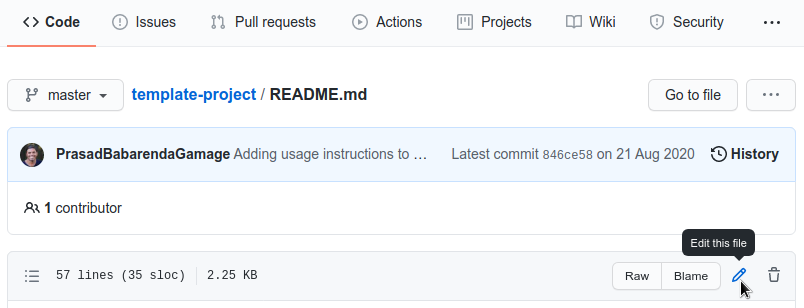
Click on the pencil button as shown in the screenshot below to edit the file.
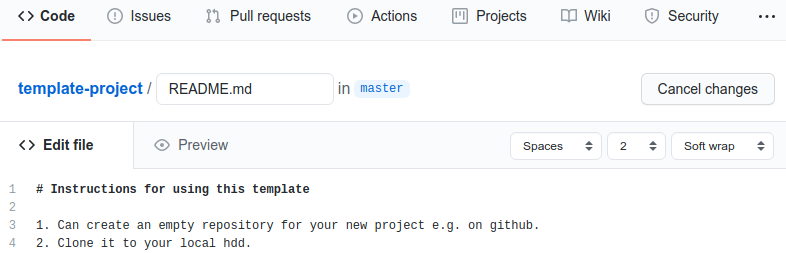
Make edits.
Preview edits by clicking on the Preview tab.
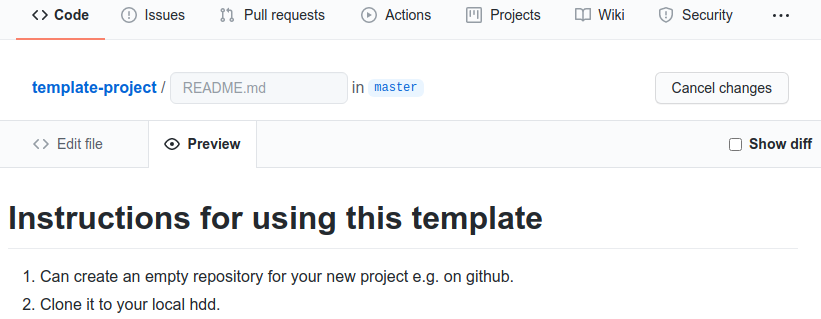
Previewing changes on github.
Once you are finished, scroll to the bottom of the page to the Section named
Commit changes.
Add a title to your commit that summarises the change that you made.
Add an optional extended description.
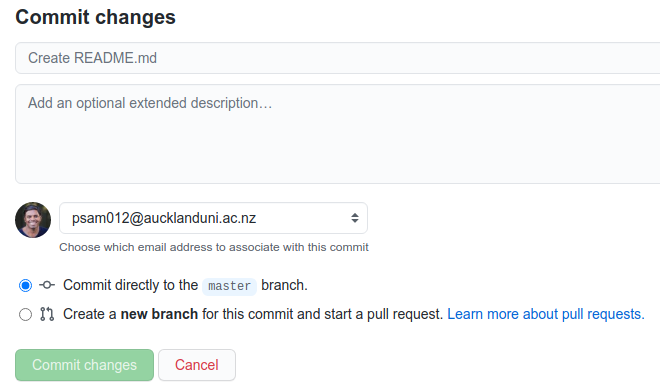
Committing changes on github.
Decide whether you want to commit directly to the
masterbranch or make the commit to a new branch and start a pull request (best practice guidelines recommend the latter option.Create a pull request from your fork to the main repository. This will allow the owner of the main repository to review your changes and determine whether it can be contributed back into the main repository.
Important
See the best practices guide for more information on the how to contribute software projects.
For additional information see the following outline on contributing to documentation via github.